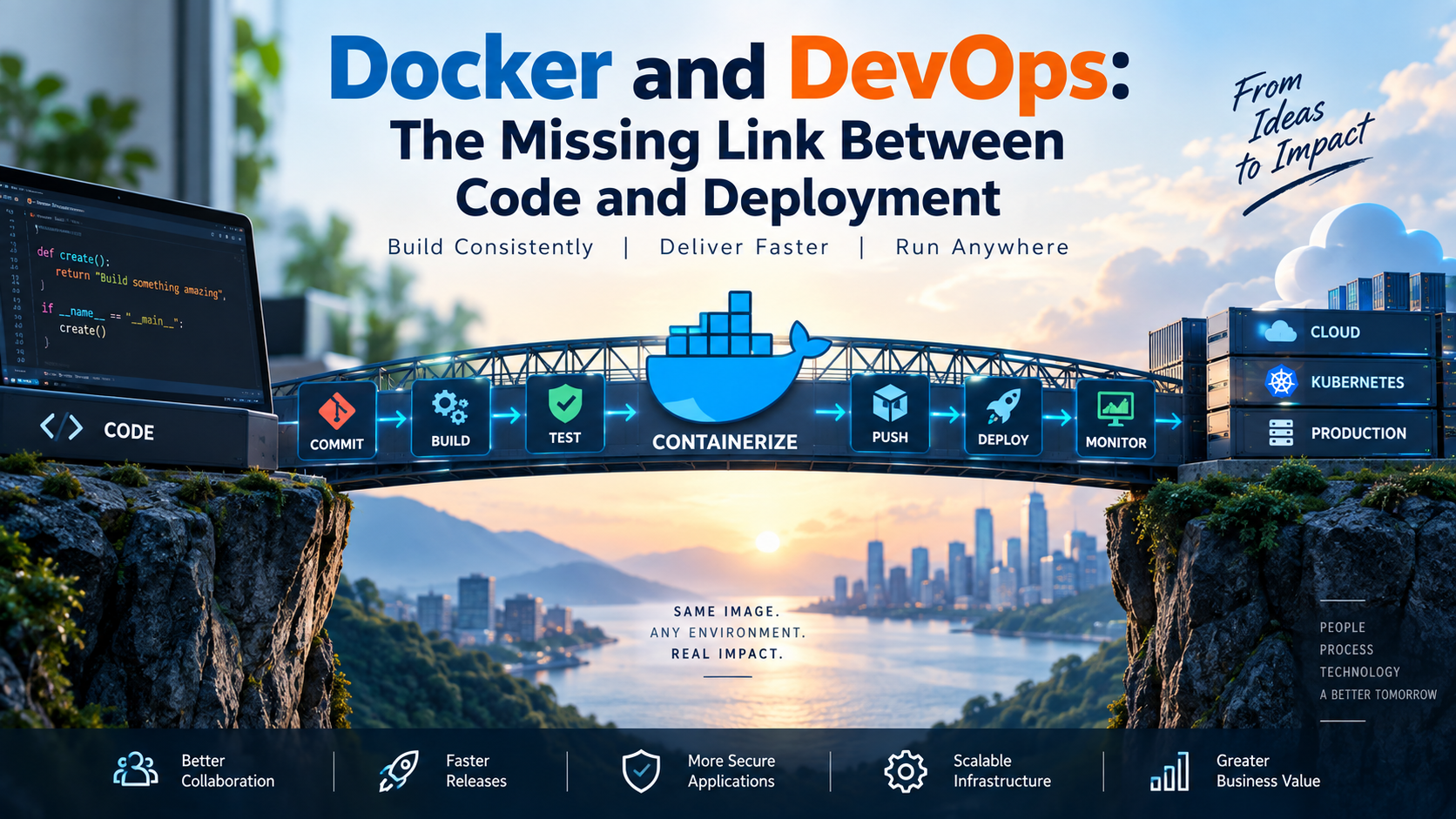
Docker and DevOps: The Missing Link Between Code and Deployment
If you have worked in software development for any length of time, you have probably heard this sentence:
“But it works on my machine.”
It sounds almost like a developer joke, but behind it is a very real engineering problem.
An application works perfectly on a developer’s laptop. It moves to the testing environment and suddenly something breaks. Perhaps the runtime version is different. Maybe a library is missing. A configuration has changed, or the underlying operating system behaves slightly differently.
Then the DevOps team begins troubleshooting an application that was supposedly “working.”
This is one of the problems Docker addresses remarkably well.
Docker did not create DevOps, and using Docker does not magically turn an organization into a DevOps organization. What Docker does provide is something extremely valuable to DevOps teams: a consistent way to package an application and move that package through the software delivery lifecycle.
That is the linkage between Docker and DevOps.
Let’s explore it.
What Does Docker Actually Solve?
Before talking about Docker commands or architecture, it helps to understand the problem.
Imagine that we have developed a web application.
For that application to work, we might need:
- a particular runtime;
- specific libraries;
- application dependencies;
- operating-system packages; and
- certain configuration.
Traditionally, we would install and configure those requirements on every environment where the application needed to run.
That creates opportunities for differences to appear.
Development might have one version of a dependency, testing another, and production something slightly different again.
Docker approaches the problem differently.
Instead of asking:
“How do I recreate this application environment on another server?”
we can ask:
“How do I package the application so that I can deploy the same artifact elsewhere?”
That small change in thinking is important.
With Docker, we define how the application should be packaged using a Dockerfile. Docker uses those instructions to create a container image, which can then be stored, distributed and used to create running containers.
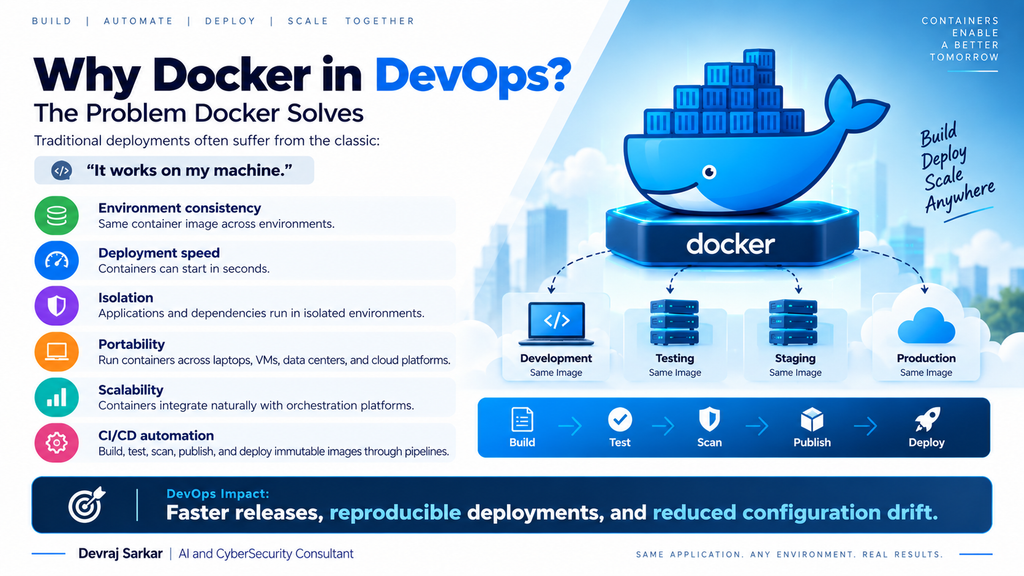
In simple terms:
Source Code
     ↓
Dockerfile
     ↓
Docker Build
     ↓
Container Image
     ↓
Running Container
This gives us one of the most useful principles in modern application delivery:
Build once, validate the artifact, and deploy the same artifact consistently.
So, Where Does DevOps Come Into the Picture?
This is where things become interesting.
DevOps is much bigger than containers. It brings development and operations closer together through collaboration, automation, continuous integration, continuous delivery, observability and shared responsibility.
Docker fits into that model because it gives both sides something consistent to work with.
Consider a typical workflow.
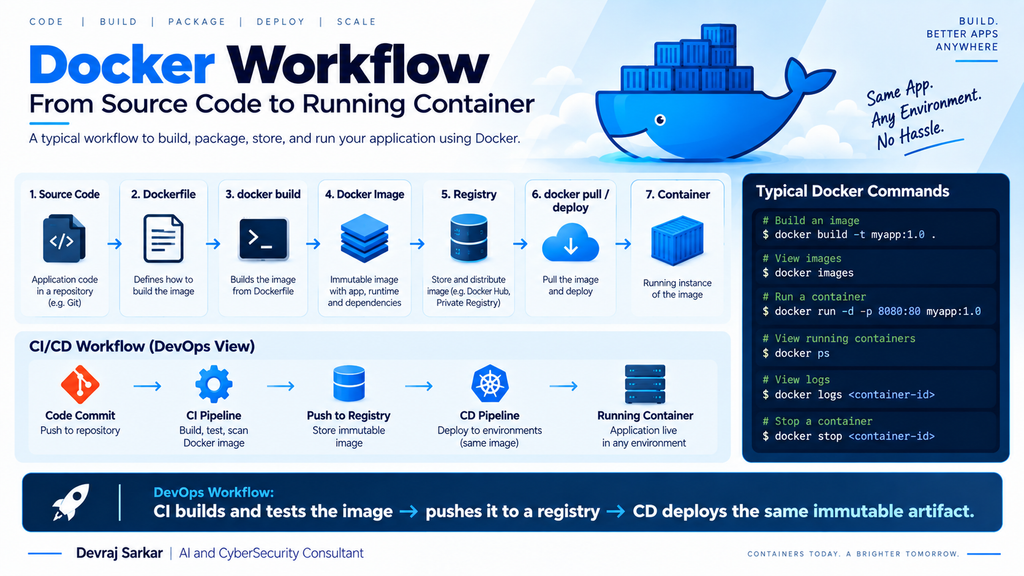
A developer writes some code and pushes it to Git.
That change triggers a CI pipeline.
The pipeline runs tests and builds a container image. The image can then be scanned for known vulnerabilities and, assuming it passes the required checks, pushed to a container registry.
The deployment process retrieves that approved image and deploys it into the required environment.
The flow might look like this:
Notice what Docker is doing here.
It is not replacing Git.
It is not replacing Jenkins or GitHub Actions.
It is not replacing Kubernetes.
And it certainly is not replacing DevOps.
Docker is providing the standardized application artifact that moves between these stages.
That distinction is worth remembering.
Docker Images and Containers Are Not the Same Thing
This is probably the most important Docker concept for anyone starting with containers.
A Docker image and a Docker container are related, but they are not interchangeable terms.
Think of the image as the packaged application template.
A container is a running instance created from that image.
For example, we might build an image called:
myapp:1.0
From that single image, we could create several containers.
                 ┌── Container 1
myapp:1.0 ───────┼── Container 2
                 └── Container 3
The underlying image remains the application artifact.
The containers are its running instances.
So if you remember only one distinction:
Image = packaged artifact. Container = running instance.
It will make the rest of Docker considerably easier to understand.
Why Docker Works So Well with CI/CD
This is where I think Docker becomes particularly valuable from a DevOps perspective.
Without a standardized artifact, a team may unintentionally rebuild or reconfigure an application at different stages.
For example:
Build for Testing
       ↓
Test
       ↓
Build Again for Staging
       ↓
Build Again for Production
Every rebuild creates another opportunity for something to change.
Perhaps a newer package gets downloaded. Perhaps the build environment changes. Perhaps somebody modifies a configuration.
A stronger approach is:
Build Image
     ↓
Test Image
     ↓
Security Scan
     ↓
Publish Approved Image
     ↓
Deploy to Staging
     ↓
Deploy Same Artifact to Production
Now we have a much clearer chain of custody.
We know what was built.
We know what was tested.
We know what was scanned.
And, most importantly, we know what was deployed.
That is exactly the kind of repeatability we want from a mature CI/CD process.
The Container Registry Is More Important Than It Looks
Once we have built an image, we need somewhere to store it.
That is the job of a container registry.
The CI pipeline pushes approved images into the registry, and deployment systems retrieve them when required.
CI Pipeline
     ↓
Docker Image
     ↓
Container Registry
     ↓
Deployment Platform
This also introduces proper versioning into the deployment process.
For example:
myapp:1.0
myapp:1.1
myapp:1.2
Now, if production is running version 1.1, we have a much clearer idea of exactly what has been deployed.
In mature environments, teams may go further and deploy using immutable image digests rather than relying only on mutable tags.
The underlying principle remains the same:
The deployment artifact should be identifiable and reproducible.
Where Kubernetes Fits — and a Common Misunderstanding
Docker and Kubernetes are frequently mentioned in the same conversation, which sometimes creates the impression that they do the same job.
They don’t.
Docker provides tooling to build container images and work with containers.
Kubernetes solves a different problem: how do we operate containerized workloads at scale?
Suppose our application suddenly needs ten instances rather than two.
We also need service discovery, rolling updates, health checks, workload scheduling and automatic recovery when an instance fails.
Those are orchestration problems.
That is where Kubernetes comes in.
The relationship is easier to understand like this:
Application Code
      ↓
Dockerfile
      ↓
Container Image
      ↓
Registry
      ↓
Kubernetes
      ↓
Running Workloads
There is also a technical detail worth clearing up.
Modern Kubernetes does not require Docker Engine as its container runtime. Kubernetes commonly works with CRI-compatible runtimes such as containerd or CRI-O.
That does not mean Docker images suddenly became irrelevant.
OCI-compatible container images built using Docker tooling can still be stored in registries and deployed as Kubernetes workloads.
So the statement “Kubernetes replaced Docker” oversimplifies what actually happened.
Docker Is One Piece of the DevOps Puzzle
Another mistake newcomers sometimes make is learning Docker and assuming they have learned DevOps.
Docker is a tool within a much larger ecosystem.
A real-world environment might look something like this:
Git manages source code.
Jenkins, GitHub Actions or GitLab CI/CD automates builds, tests and delivery workflows.
Docker provides standardized container packaging.
Container registries store and distribute images.
Kubernetes orchestrates containerized workloads.
Terraform provisions infrastructure.
Ansible automates configuration and operational tasks.
Prometheus collects metrics.
Grafana turns those metrics into useful dashboards.
Put everything together and we get something like:
Git
 ↓
CI/CD
 ↓
Build Container Image
 ↓
Test + Security Scan
 ↓
Container Registry
 ↓
Kubernetes / Cloud
 ↓
Monitoring & Observability
Docker sits in a particularly interesting position because it connects what developers build with what operations eventually runs.
And What About Security?
Containers provide isolation, but containerization should never be confused with automatic security.
A badly built container image can still contain vulnerable packages, exposed secrets, unnecessary software or insecure configurations.
This is why Docker fits naturally into DevSecOps as well.
Security checks can become part of the pipeline rather than something performed just before production.
A sensible container workflow might include:
There are several practical habits worth developing.
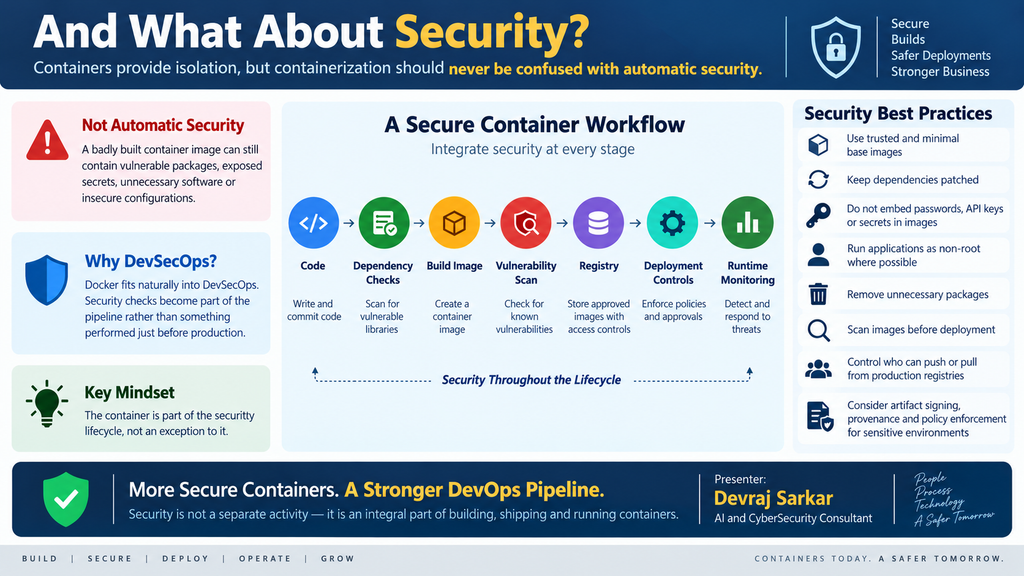
Use trusted and preferably minimal base images. Keep dependencies patched. Avoid embedding passwords, API keys or other secrets inside images. Run applications as non-root where practical. Remove unnecessary packages. Scan images before deployment, and control who can push or pull images from production registries.
For security-sensitive environments, artifact signing, provenance and policy enforcement can take this further.
The important point is that the container becomes part of the security lifecycle, not an exception to it.
Frequently Asked Questions About Docker and DevOps
Is Docker required for DevOps?
No. DevOps is a set of cultural and engineering practices, not a particular toolset. Docker is widely used because containerization supports many DevOps objectives, including consistency, automation and repeatable deployments.
Why is Docker useful in CI/CD?
Docker allows a CI/CD pipeline to create a standardized application image that can be tested, scanned, stored and subsequently deployed as the same artifact.
What is the difference between Docker and Kubernetes?
Docker provides container-related tooling, including image building. Kubernetes orchestrates containerized workloads and handles capabilities such as scheduling, scaling, service discovery and desired-state management.
Can Docker eliminate “works on my machine” problems?
It can significantly reduce environment-related differences by packaging application dependencies consistently. It cannot eliminate every problem because external services, infrastructure, configuration, CPU architecture and other environmental factors can still affect application behaviour.
Is a Docker container a virtual machine?
No. Virtual machines typically include complete guest operating systems running through a hypervisor. Containers normally share the host kernel while providing isolated application environments, which generally makes them more lightweight.
The Real Docker–DevOps Link
After all the terminology, tools and architecture, the relationship between Docker and DevOps comes down to something quite simple.
DevOps needs repeatability.
It needs to take something created by development, validate it automatically, deliver it reliably and operate it predictably.
Docker gives that process a standardized application artifact.
The developer creates the code.
Git tracks it.
CI builds and validates it.
Docker packages it.
A registry stores it.
CD delivers it.
Kubernetes or another platform runs it.
And observability tools tell us how it is behaving.
That is why Docker has become so closely associated with modern DevOps.
Not because containers are DevOps, but because containers solve one of DevOps’ most important engineering challenges:
moving software from development to production without unnecessarily changing what we are deploying along the way.
If there is one principle worth taking away, it is this:
Build once. Test and secure the artifact. Store it with a clear identity. Then deploy that same artifact consistently.
That is the real linkage between Docker and DevOps.

AI, Cybersecurity & Agentic AI Consultant
AI & Cybersecurity Consultant | Agentic AI & AI Strategy | Responsible AI & AI Ethics | AI Governance | AI Security | Trusted Autonomous Business Solutions | Technology Mentor
With 23+ years of experience in cybersecurity and a growing focus on Artificial Intelligence, Responsible AI, and Agentic AI, I help organizations navigate the intersection of technology, business innovation, security, ethics, and risk.
My consulting focus is evolving from securing infrastructure to helping organizations securely and responsibly adopt AI as a business capability.
I advise organizations on designing and implementing AI-powered and agentic business solutions that can reason, orchestrate workflows, interact with enterprise systems, and execute tasks with appropriate levels of autonomy—while maintaining security, governance, transparency, accountability, and human oversight.
AI Strategy, Ethics & Governance
I help organizations establish practical frameworks for Responsible AI and AI Ethics, addressing questions that go beyond technical performance:
How should AI systems make decisions—and when should humans remain in control?
How do we ensure fairness, transparency, explainability, and accountability?
How do we protect sensitive data and intellectual property when using AI?
How do we manage AI hallucination, model risk, bias, and unintended outcomes?
How do we govern autonomous AI agents operating across enterprise systems?
How do we establish AI policies, controls, risk assessments, and governance models that enable innovation rather than restrict it?
My approach connects AI Ethics, AI Governance, Cybersecurity, Privacy, Risk Management, and Business Strategy into a unified Responsible AI framework.
Agentic AI & Business Transformation
A major area of my consulting interest is Agentic AI—moving beyond conversational AI toward intelligent systems capable of planning, reasoning, collaborating, using tools, and executing multi-step business processes.
I help organizations explore and architect agentic solutions for areas such as:
AI-powered Security Operations and Autonomous SOC
Intelligent incident investigation and response
Enterprise knowledge and decision-support systems
AI-driven IT operations and automation
Customer service and intelligent service orchestration
Business process automation
Risk, compliance, and audit intelligence
Cyber threat intelligence and autonomous analysis
AI-powered enterprise assistants and multi-agent systems
Security and compliance agents integrated into DevSecOps
AI agents for operational and executive decision support
The emphasis is not simply on deploying an AI agent, but on designing an enterprise-grade agentic architecture with the right balance of autonomy, human-in-the-loop controls, security, observability, governance, and measurable business value.
AI Security & Cybersecurity
My cybersecurity background provides the foundation for approaching AI from an adversarial and risk perspective.
I focus on securing the AI lifecycle and AI-enabled enterprise, including:
AI Security → Model Security → Data Security → Agent Security → Identity → Tool/API Security → Runtime Protection → Monitoring → Governance
This includes emerging areas such as AI threat modeling, adversarial AI/ML, prompt injection, model abuse, AI supply-chain risk, agentic AI security, identity and access management for AI agents, and AI-assisted security operations.
Cloud, DevSecOps & AI Engineering
My experience across AWS, Azure, GCP, Kubernetes, IAM, Linux/Windows security, Terraform, GitLab CI/CD, OPA, Checkov, SIEM, digital forensics, and security automation allows me to connect AI initiatives with the underlying enterprise technology ecosystem.
I help bridge the gap between:
Business Strategy ↔ AI Strategy ↔ Agentic AI ↔ Cybersecurity ↔ Governance ↔ Cloud ↔ DevSecOps
My Consulting Mission
I believe the next generation of enterprise transformation will not be defined simply by adopting AI—it will be defined by how responsibly, securely, ethically, and intelligently organizations operationalize AI.
My mission is to help organizations move from:
AI Experimentation → AI Adoption → AI Governance → Agentic AI → Responsible Autonomous Business
while ensuring that human values, business objectives, security, and accountability remain at the center of intelligent automation.
I help organizations turn AI from an emerging technology into a trusted, governed, and business-driven capability.
AI Strategy | Responsible AI | AI Ethics | AI Governance | Agentic AI | AI Security | Cybersecurity Transformation | Cloud & DevSecOps